UDP(User Datagram Protocol)
UDP全称为:用户数据报协议。
特点
- 无需事先建立连接;
- 数据不安全,容易丢;
- 效率高;(耗费资源少)
- 发送的数据量有大小限制;
相关类&常用方法(※)
- 相关类:
- DatagramSocket: 表示一个端点(套接字);如果是发送端,往往采用空参数的构造方法,而接收端必须指定固定的端口号;
- DatagramPacket: 表示一个包装袋;如果是发送端,需要指定接收端的ip和端口号;如果是接收端,只需要指定保存数据的数组和可用长度即可;
- 常用方法:
- 构造方法(创建Socket对象):
Public DatagramSocket():创建客户端的Socket对象,系统会随机分配一个端口号Public DatagramSocket(int port): 创建服务端的Socket对象,并指定端口号。
- 构造方法(创建DatagramPacket数据包对象):
public DatagramPacket(byte[] arr, int length, InetAddress address, int port)
public DatagramPacket(byte[] arr, int length)
- Socket实例方法(必须拿类的对象来调用):
public void send(DatagramPacket dp): 发送数据包public void receive(DatagramPacket dp): 使用数据包接收数据
- DatagramPacket实例方法:
- public int getLength(): 获取数据包实际接收到的字节个数
Demo01(简单收发数据)
1
2
3
4
5
6
7
8
9
10
11
12
13
14
15
16
17
18
19
20
21
22
23
24
25
26
27
28
29
30
31
32
33
34
35
36
37
38
39
|
public class myUDPSend {
public static void main(String[] args) throws Exception {
DatagramSocket ds = new DatagramSocket();
byte[] arr = "你好呀!".getBytes();
DatagramPacket dp = new DatagramPacket(arr, arr.length, InetAddress.getLocalHost(), 5888);
ds.send(dp);
System.out.println("客户端发送完成");
ds.close();
}
}
public class myUDPRecv {
public static void main(String[] args) throws Exception {
DatagramSocket ds = new DatagramSocket(5888);
byte[] arr = new byte[1024];
DatagramPacket dp = new DatagramPacket(arr, arr.length);
ds.receive(dp);
System.out.println("接收端接收完成!");
int length = dp.getLength();
String s = new String(arr, 0, length);
System.out.println("接收端收到了:" + s);
ds.close();
}
}
|
Demo02(持续收发数据)
1
2
3
4
5
6
7
8
9
10
11
12
13
14
15
16
17
18
19
20
21
22
23
24
25
26
27
28
29
30
31
32
33
34
35
36
37
38
39
40
41
42
43
44
45
| public class udpContinueSend {
public static void main(String[] args) throws Exception {
DatagramSocket ds = new DatagramSocket();
while (true) {
Scanner s = new Scanner(System.in);
System.out.println("请输入需要发送的数据(Q表示退出):");
String message = s.next();
byte[] arr = message.getBytes();
DatagramPacket dp = new DatagramPacket(arr, arr.length, InetAddress.getLocalHost(), 5888);
ds.send(dp);
if ("Q".equals(message)) {
System.out.println("客户端结束!");
break;
}
}
ds.close();
}
}
public class udpContinueRecv {
public static void main(String[] args) throws Exception {
DatagramSocket ds = new DatagramSocket(5888);
byte[] arr = new byte[1024];
DatagramPacket dp = new DatagramPacket(arr, arr.length);
while (true) {
ds.receive(dp);
String s = new String(arr, 0, dp.getLength());
System.out.println("客户端对我们说:"+s);
if ("Q".equals(s)) {
System.out.println("服务器已经结束!");
break;
}
}
ds.close();
}
}
|
TCP(Transmission Control Protocol)
传输控制协议: 是一种需要事先建立连接,且安全,无数据大小限制的数据传输协议;
特点
- 需要事先建立连接(三次握手)
- 安全
- 无数据大小限制
- 耗费资源多,效率低
数据交互的原理
相关类&常用方法(※)
Demo01(入门案例)
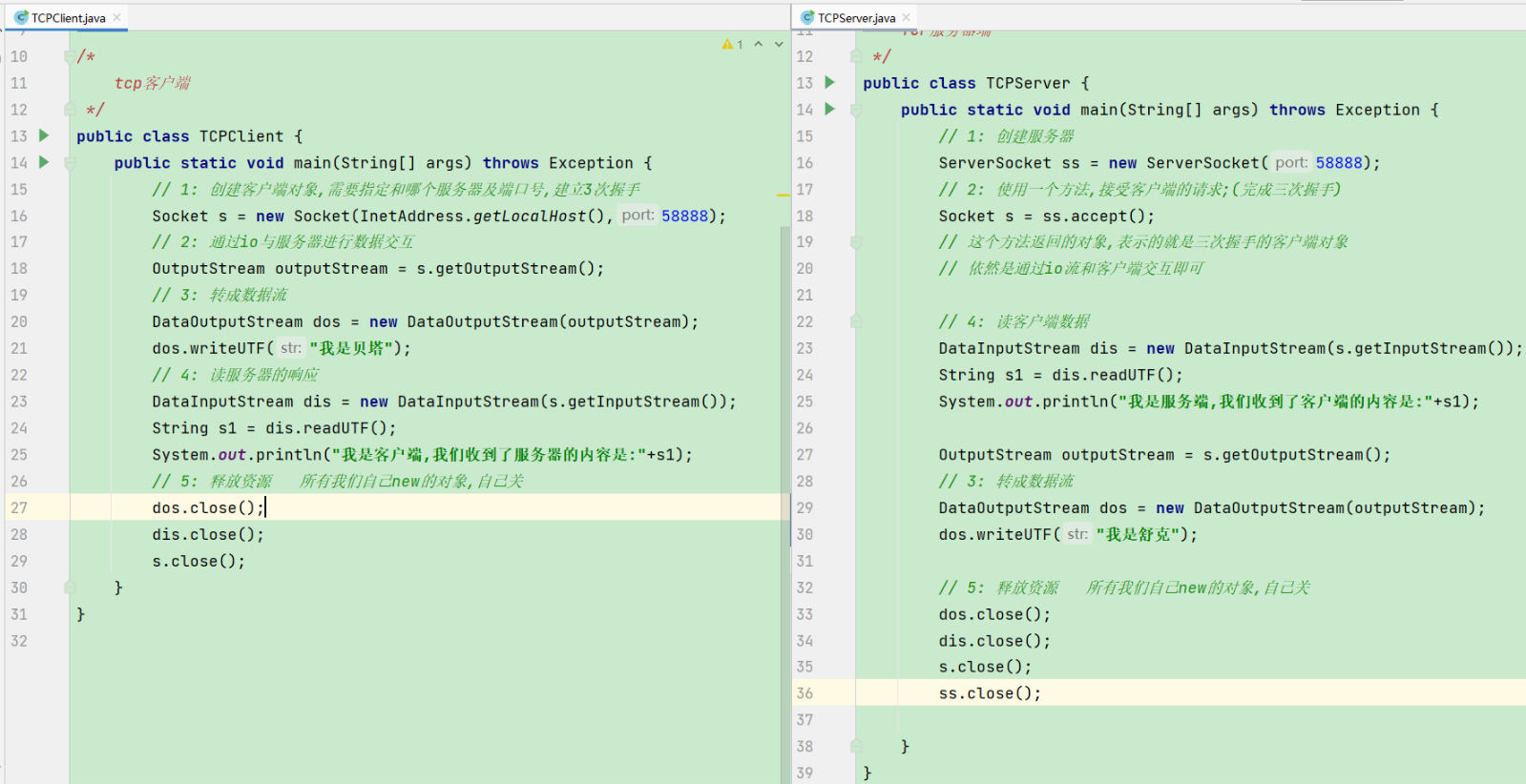
Demo02(聊天案例)
思路
- 在客户端和服务器端各自准备两个线程,相互循环读写数据即可;
代码
1
2
3
4
5
6
7
8
9
10
11
12
13
14
15
16
17
18
19
20
21
22
23
24
25
26
27
28
29
30
31
32
33
34
35
36
37
38
39
40
41
42
43
44
45
46
47
48
49
50
51
52
53
54
55
56
57
58
59
60
61
62
63
64
65
66
67
68
69
70
71
72
73
74
75
76
77
78
79
80
81
82
83
84
85
86
87
88
89
90
91
92
93
94
95
96
97
98
99
100
101
102
103
104
105
106
107
108
109
110
111
112
113
114
115
116
117
118
119
120
121
122
123
124
125
|
public class TCPClient {
public static void main(String[] args) throws Exception {
Socket s = new Socket(InetAddress.getLocalHost(), 58888);
DataInputStream dis = new DataInputStream(s.getInputStream());
OutputStream outputStream = s.getOutputStream();
DataOutputStream dos = new DataOutputStream(outputStream);
Thread du = new Thread(() -> {
try {
while (true) {
String s1 = dis.readUTF();
System.out.println("我是客户端,我们收到服务器的内容是:" + s1);
if ("0".equals(s1)) {
System.out.println("客户端读数据已退出");
break;
}
}
} catch (Exception e) {
e.printStackTrace();
}
});
du.start();
Thread xie = new Thread(() -> {
try {
Scanner sc = new Scanner(System.in);
while (true) {
System.out.println("我是客户端,请输入您想对服务器说的话:(0表示结束)");
String s1 = sc.nextLine();
dos.writeUTF(s1);
if ("0".equals(s1)) {
System.out.println("客户端写已退出");
Thread.sleep(1000);
break;
}
}
} catch (Exception e) {
e.printStackTrace();
}
});
xie.start();
xie.join();
du.join();
dos.close();
dis.close();
s.close();
System.out.println("mian结束了...");
}
}
public class TCPServer {
public static void main(String[] args) throws Exception {
ServerSocket ss = new ServerSocket(58888);
Socket s = ss.accept();
OutputStream outputStream = s.getOutputStream();
DataOutputStream dos = new DataOutputStream(outputStream);
DataInputStream dis = new DataInputStream(s.getInputStream());
Thread du = new Thread(() -> {
try {
while (true) {
String s1 = dis.readUTF();
System.out.println("我是服务端,我们收到客户端的内容是:" + s1);
if ("0".equals(s1)) {
System.out.println("服务端读数据已退出");
break;
}
}
} catch (Exception e) {
e.printStackTrace();
}
});
du.start();
Thread xie = new Thread(() -> {
try {
Scanner sc = new Scanner(System.in);
while (true) {
System.out.println("我是服务端,请输入您想对客户端说的话:(0表示结束)");
String s1 = sc.nextLine();
dos.writeUTF(s1);
if ("0".equals(s1)) {
System.out.println("服务端写已退出");
Thread.sleep(1000);
break;
}
}
} catch (Exception e) {
e.printStackTrace();
}
});
xie.start();
xie.join();
du.join();
dis.close();
dos.close();
s.close();
ss.close();
}
}
|
Demo03(模拟BS架构的服务器)
思路
- 只需要按HTTP协议的格式,给浏览器响应对应的数据即可;
代码
1
2
3
4
5
6
7
8
9
10
11
12
13
14
15
16
17
18
19
20
21
22
23
24
25
26
27
28
29
30
31
32
33
34
35
|
public class MyServer {
public static void main(String[] args) throws IOException {
ServerSocket ss = new ServerSocket(8099);
System.out.println("服务器已经启动成功!");
while (true){
System.out.println("服务器等待连接中........");
Socket accept = ss.accept();
System.out.println(accept.getRemoteSocketAddress().toString()+"来请求我了...");
new Thread(()->{
try {
PrintStream ps = new PrintStream(accept.getOutputStream());
ps.println("HTTP/1.1 200 halsshao");
ps.println("Content-Type:text/html;charset=utf-8");
ps.println();
ps.println("<div style=\"color: aqua;font-size: 30px;text-align: center;border: 2px solid green\">为所欲为</div>");
ps.close();
} catch (Exception e) {
e.printStackTrace();
}
}).start();
}
}
}
|
Demo04(群聊案例)
思路
在客户端准备两个线程,分别循环读写数据;
在服务器端,准备一个集合,每个客户端连接之后,都先将客户端对象添加到集合中;
创建一个线程,循环读客户端数据,每次读到数据之后,都遍历集合中的每个对象,分别写出去即可;
代码
1
2
3
4
5
6
7
8
9
10
11
12
13
14
15
16
17
18
19
20
21
22
23
24
25
26
27
28
29
30
31
32
33
34
35
36
37
38
39
40
41
42
43
44
45
46
47
48
49
50
51
52
53
54
55
56
57
58
59
60
61
62
63
64
65
66
67
68
69
70
71
72
73
74
75
76
77
78
79
80
81
82
83
84
85
86
87
88
89
90
91
92
93
94
95
96
97
98
99
100
101
102
103
104
105
106
107
108
109
110
111
112
113
114
115
116
117
118
|
public class TCPClient {
public static void main(String[] args) throws Exception {
Socket s = new Socket(InetAddress.getByName("192.168.31.117"), 56666);
DataInputStream dis = new DataInputStream(s.getInputStream());
OutputStream outputStream = s.getOutputStream();
DataOutputStream dos = new DataOutputStream(outputStream);
Thread du = new Thread(() -> {
try {
while (true) {
String s1 = dis.readUTF();
System.out.println("我是客户端,我们收到服务器的内容是:" + s1);
}
} catch (Exception e) {
}
});
du.start();
Thread xie = new Thread(() -> {
try {
Scanner sc = new Scanner(System.in);
while (true) {
System.out.println("我是客户端,请输入您想对服务器说的话:(0表示结束)");
String s1 = sc.nextLine();
dos.writeUTF(s1);
if ("0".equals(s1)) {
System.out.println("客户端写已退出");
break;
}
}
} catch (Exception e) {
e.printStackTrace();
}
});
xie.start();
xie.join();
du.stop();
dos.close();
dis.close();
s.close();
System.out.println("mian结束了...");
}
}
public class MyRun implements Runnable {
private Socket s;
private ArrayList<Socket> all;
public MyRun(Socket s, ArrayList<Socket> all) {
this.s = s;
this.all = all;
}
@Override
public void run() {
try {
DataInputStream dis = new DataInputStream(s.getInputStream());
while (true) {
String s1 = dis.readUTF();
for (int i = all.size() - 1; i >= 0; i--) {
Socket qt = all.get(i);
DataOutputStream dos = new DataOutputStream(qt.getOutputStream());
if ("0".equals(s1)) {
dos.writeUTF(s.getRemoteSocketAddress().toString() + "要下线了...."+"下线后的在线人数是:"+(all.size()-1));
} else {
dos.writeUTF(s.getRemoteSocketAddress().toString()+"说:"+s1+"当前在线人数是:"+all.size());
}
}
}
} catch (Exception e) {
all.remove(s);
System.out.println(s.getRemoteSocketAddress().toString() + "下线了...");
}
}
}
public class MyServer {
public static void main(String[] args) throws Exception {
ServerSocket ss = new ServerSocket(56666);
ArrayList<Socket> all = new ArrayList<>();
while (true) {
Socket s = ss.accept();
all.add(s);
System.out.println(s.getRemoteSocketAddress().toString() + "上线了...");
new Thread(new MyRun(s,all)).start();
}
}
}
|

 微信
微信 支付宝
支付宝