StringBuilder
概述
是java编写的一个专门用于字符串拼接的类,可以当成一个字符串拼接的容器使用,提供了对容器中的数据进行增删改的功能,并提升了字符串的拼接效率;
作用
- 提供了字符串拼接,反转,修改内容的方法,弥补了字符串对象
不能修改内容的缺点;
提升了字符串拼接的效率;
使用方式
- 由于类中的方法都是非静态的,而且字符串工具,你没有个对象调什么方法,所以还是老老实实造对象吧。
- 利用构造方法创建对象;
- 面向创建好的对象直接调用类中的方法即可;
常用方法
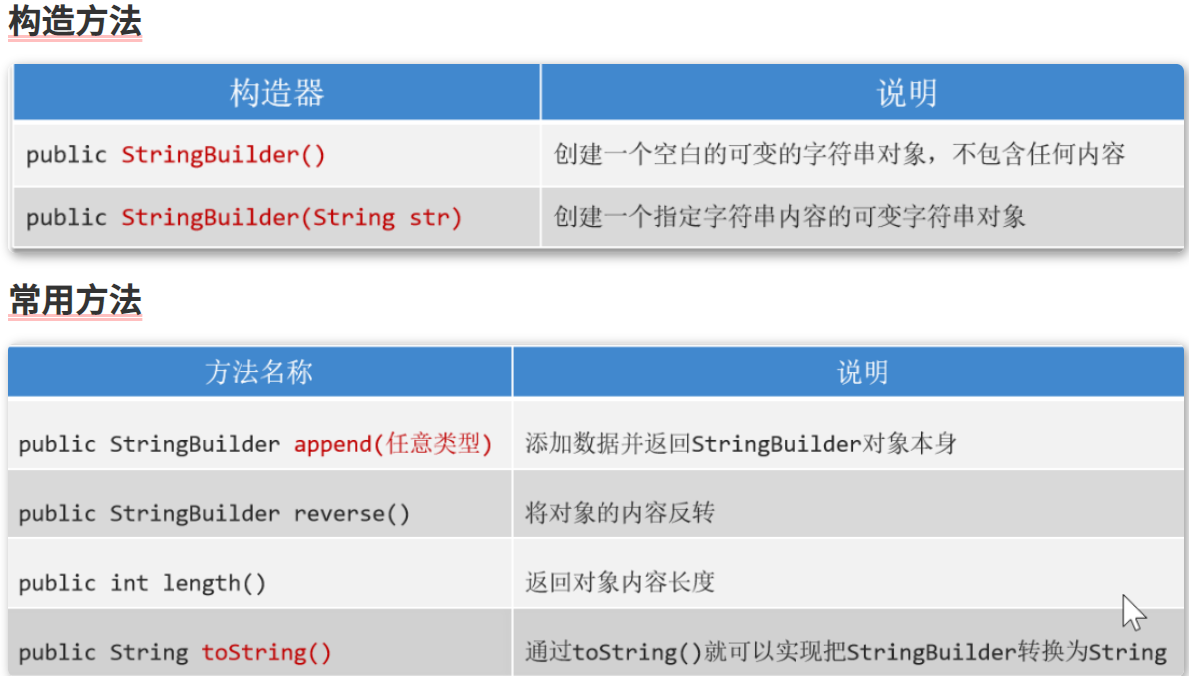
方法介绍
- 空参,全参构造
- append(任意类型):将任意的数据类型追加到StringBuilder对象的末尾并返回对象本身
- reverse():反转sb对象
- 对象名.length():返回对象的长度
- 对象名.toString():将StringBuilder对象转为String基本数据类型
代码案例
1
2
3
4
5
6
7
8
9
10
11
12
13
14
15
16
17
18
19
|
public class StringBuilderCourse {
public static void main(String[] args) {
StringBuilder sb = new StringBuilder();
sb.append(123);
sb.append(true);
sb.append("heihei");
sb.append(5.6);
sb.append('好');
System.out.println(sb);
sb.reverse();
System.out.println(sb);
}
}
|
StringBuilder应用场景
StringBuilder的两个常见的应用场景为:
Example1
说实话:Python中一行代码顶Java100行,下面代码等于一句','.join(list)
1
2
3
4
5
6
7
8
9
10
11
12
13
14
15
16
17
18
19
20
21
22
23
24
25
26
27
28
29
30
31
32
33
34
35
36
37
38
39
|
public class StringBuilderExample1 {
public static void main(String[] args) {
int[] arr = {4, 7, 8, 9, 5, 3};
String res = toString(arr);
System.out.println(res);
}
public static String toString(int[] arr){
if (arr == null){
return null;
}
if (arr.length == 0){
return "[]";
}
StringBuilder sb = new StringBuilder("[");
for (int i = 0; i < arr.length; i++) {
sb.append(arr[i]);
if (i != arr.length -1){
sb.append(',');
}else {
sb.append(']');
}
}
return sb.toString();
}
}
|
Example2
1
2
3
4
5
6
7
8
9
10
11
12
13
14
15
16
17
18
19
20
21
22
23
24
25
|
public class JudgeSymmetry {
public static void main(String[] args) {
String s = "accd";
System.out.println(symmetry(s));
}
public static boolean symmetry(String s){
StringBuilder sb = new StringBuilder(s);
StringBuilder newSb = sb.reverse();
String newStr = newSb.toString();
if (newStr.equals(s)){
return true;
}else {
return false;
}
}
}
|
StringJoiner
概述
是java8提供的一个专门针对有规律的字符串拼接的一个类;
作用
- 能保证字符串的拼接效率;
- 能保证拼接字符串的简洁度;
使用场景
- 只能针对字符串或字符串缓冲区拼接;
- 必须保证要拼接的结果是有规律的!
常用方法
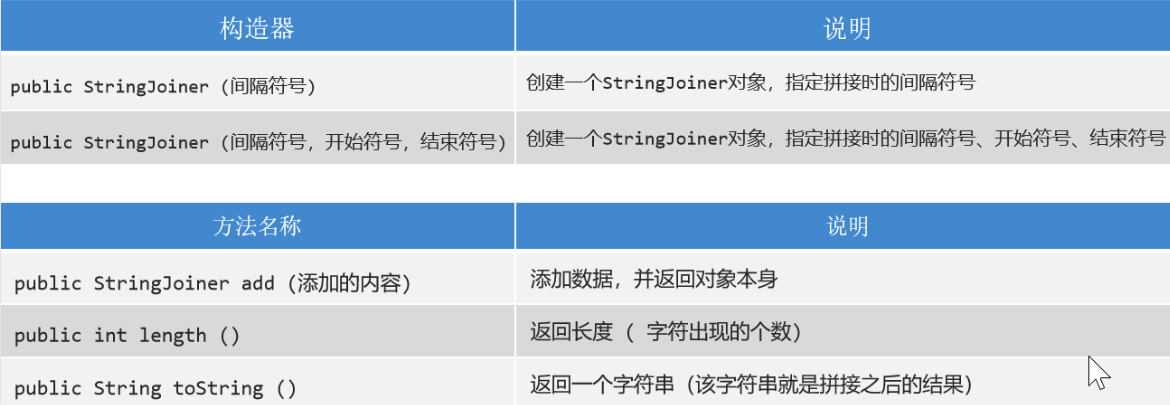
跟StringBuilder类的方法区别就在于StringBuilder 添加元素是append,而StringJoiner是add
- 空参,全参构造方法
- add(基本数据类型的数据):添加数据,类似于StringBuilder中的append
- length:这个不多说了
- toString:这个是个Stringxxx的方法都支持的吧
代码案例
1
2
3
4
5
6
7
8
9
10
11
12
13
14
15
16
17
18
19
20
21
22
23
24
25
26
|
public class JudgeSymmetry {
public static void main(String[] args) {
String s = "accd";
System.out.println(symmetry(s));
}
public static boolean symmetry(String s){
StringBuilder sb = new StringBuilder(s);
StringBuilder newSb = sb.reverse();
String newStr = newSb.toString();
if (newStr.equals(s)){
return true;
}else {
return false;
}
}
}
|
Math
概述
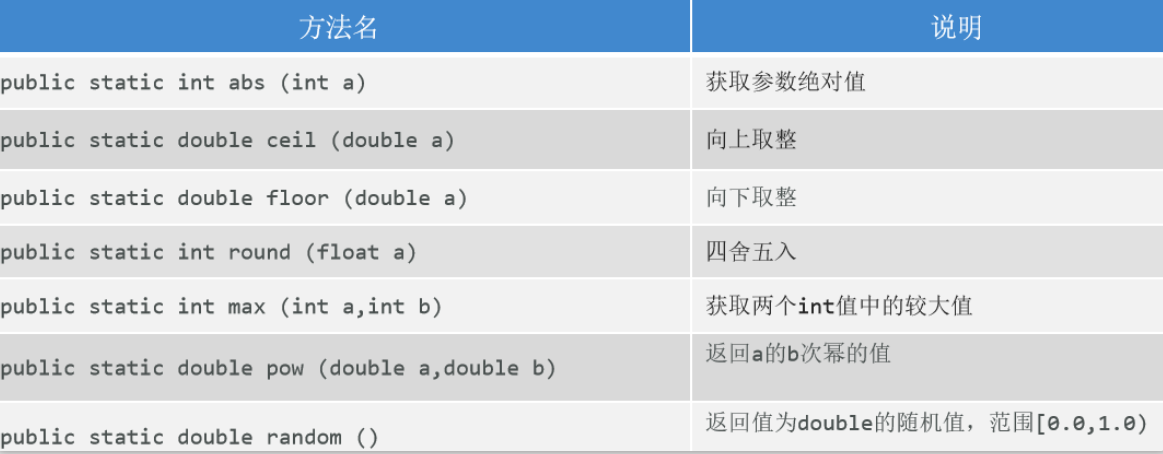
java提供的专门进行数学运算的工具类;所有方法都是静态方法,通过类名直接调用即可;
常用方法
代码案例
1
2
3
4
5
6
7
8
9
10
11
12
13
14
15
16
17
18
19
20
21
22
23
| public class MyMath {
public static void main(String[] args) {
System.out.println(Math.abs(-5));
System.out.println(Math.ceil(3.01));
System.out.println(Math.floor(5.9));
System.out.println(Math.round(5.5));
System.out.println(Math.max(5.0,-4));
System.out.println(Math.pow(2, 3));
System.out.println(Math.random());
}
}
|
System
概述
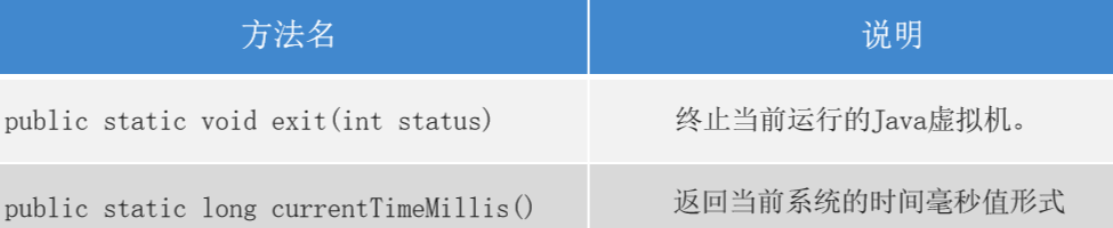
专门用于描述系统相关操作的工具类,里面所有的方法都是静态的!
常用方法
 da
da
代码案例
1
2
3
4
5
6
7
8
9
10
11
12
|
public class MySystem {
public static void main(String[] args) {
System.out.println("嘿嘿");
System.out.println("看看能执行吗");
System.out.println(System.currentTimeMillis());
}
}
|
Runtime
概述
与当前程序应用环境相关的工具类,获取对象的时候,利用 静态的getRuntime()方法,获取对象后,利用对象调用成员方法;
常用方法
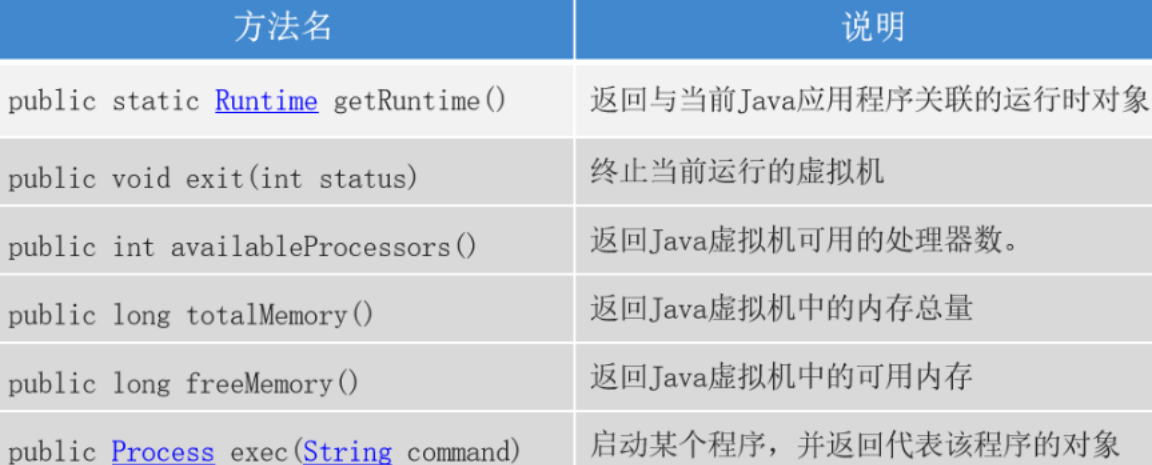
代码案例
1
2
3
4
5
6
7
8
9
10
11
12
13
14
15
16
17
18
19
20
21
22
23
24
25
26
27
| import java.io.IOException;
import java.util.Scanner;
public class MyRuntime {
public static void main(String[] args) throws IOException {
Runtime r = Runtime.getRuntime();
System.out.println(r.availableProcessors());
System.out.println(r.totalMemory() / 1024 / 1024 + "MB");
System.out.println(r.freeMemory() / 1024 / 1024 + "MB");
Process process = r.exec("notepad");
Scanner sc = new Scanner(System.in);
System.out.println("请输入任意内容,让程序继续执行!");
sc.next();
process.destroy();
}
}
|
BigDecimal
概述
java编写的专门用于精确运算的类;
作用
对小数可以完成精确运算;
使用方式
- 创建对象
- 调用方法
获取对象的方式
- 方式一:利用构造方法;
public BigDecimal(String val) -- 把String变成BigDecimal
- 方式二:利用静态方法;
public static BigDecimal valueOf(double val) -- 把double类型的变量变成BigDecimal
常用成员方法(必须要有对象
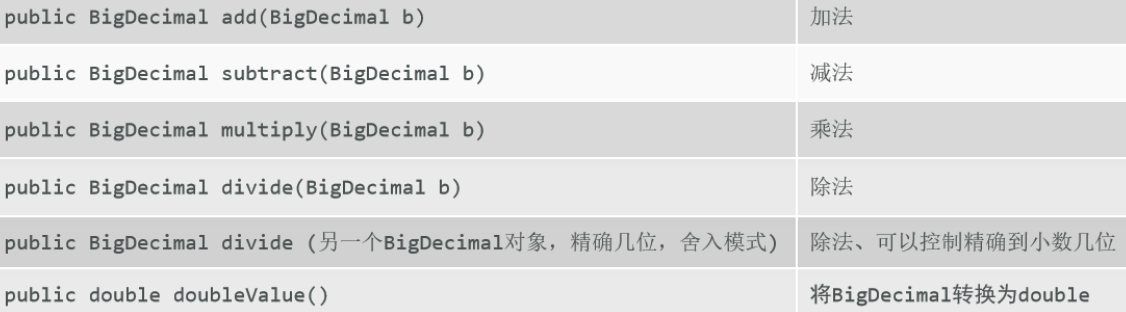
代码案例
1
2
3
4
5
6
7
8
9
10
11
12
13
14
15
16
17
18
19
20
21
22
23
24
25
| import java.math.BigDecimal;
public class MyBigDecimal {
public static void main(String[] args) {
System.out.println(0.2 + 0.1);
BigDecimal bd1 = new BigDecimal("0.1");
BigDecimal bd2 = BigDecimal.valueOf(0.2);
BigDecimal add = bd1.add(bd2);
double v = add.doubleValue();
System.out.println(v);
System.out.println(bd1.subtract(bd2).doubleValue());
System.out.println(bd1.multiply(bd2).doubleValue());
System.out.println(bd1.divide(bd2).doubleValue());
}
}
|
Notice: divide方法除不尽情况
可以在divide方法中传递3个参数,第1个参数是除数,第2个参数是保留的小数位数,第3个参数是java写好的枚举类中罗列的舍入模式;
比较常见的舍入模式有3个:UP, DOWN, HALF_UP
Tips: RoundingMode(枚举类名)
CodeDemo
1
2
3
4
5
6
7
8
9
10
11
12
13
14
| public class MyBigDecimal_pro {
public static void main(String[] args) {
BigDecimal bd1 = new BigDecimal("0.2");
BigDecimal bd2 = BigDecimal.valueOf(0.3);
BigDecimal divide = bd1.divide(bd2, 3, RoundingMode.HALF_UP);
System.out.println(divide.doubleValue());
}
}
|
JDk7日期
Date概述
是java7以前提供的用于表示时间点的类,以1970年1月1日0点0分0秒为时间原点;
里面很多方法都被废弃了。
常用方法
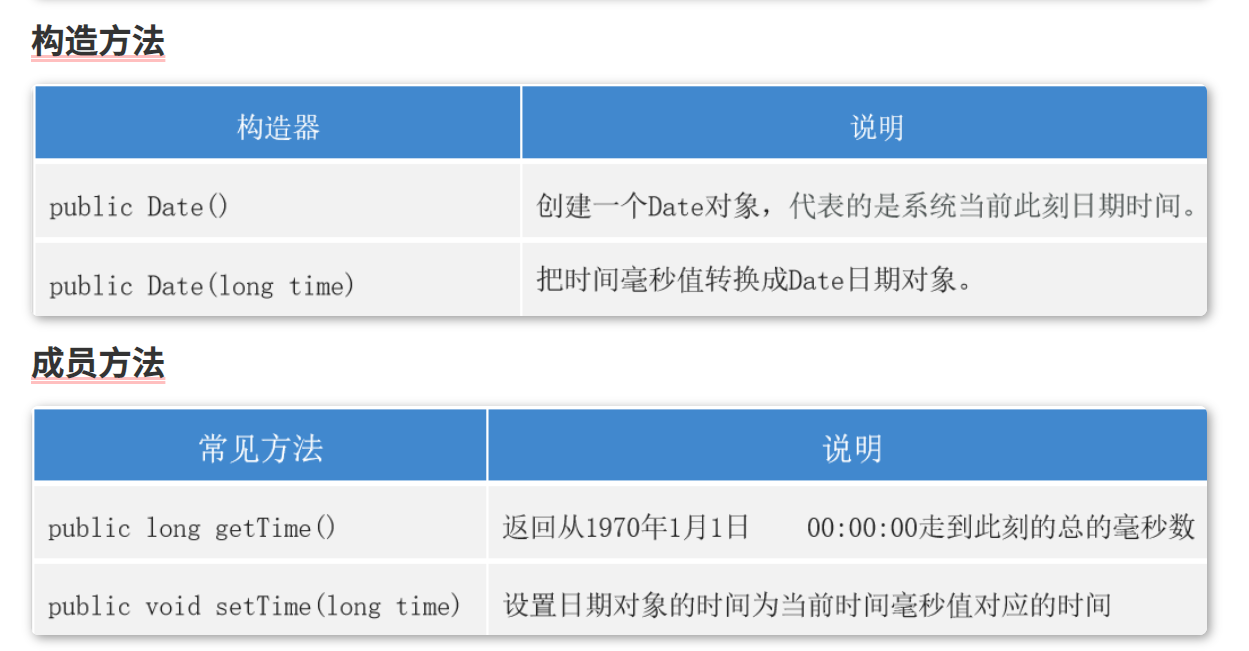
代码案例
1
2
3
4
5
6
7
8
9
10
11
12
13
14
15
16
17
18
19
20
| import java.util.Date;
public class MyDate {
public static void main(String[] args) {
Date d = new Date();
System.out.println(d);
System.out.println(d.toLocaleString());
Date d1 = new Date(-1000 * 60 * 60 * 24 * 7);
System.out.println(d1.toLocaleString());
System.out.println(d1.getTime());
System.out.println(d.getTime());
System.out.println(System.currentTimeMillis());
}
}
|
JDK7的日期格式化工具类
是java专门针对Date类提供的工具类;可以将Date和字符串之间进行相互转换!
如何使用
- 创建工具对象;(一般会指定字符串的格式,既模式字符串)
- 使用工具对象,调用方法,即可完成字符串和Date的相互转换;
常用方法
格式化
1
| 将Date转成字符串,这个过程叫做格式化;对应的方法名: format(日期对象);
|
解析
1
| 将字符串转成Date,这个过程叫做解析;对应的方法名: parse(字符串);
|
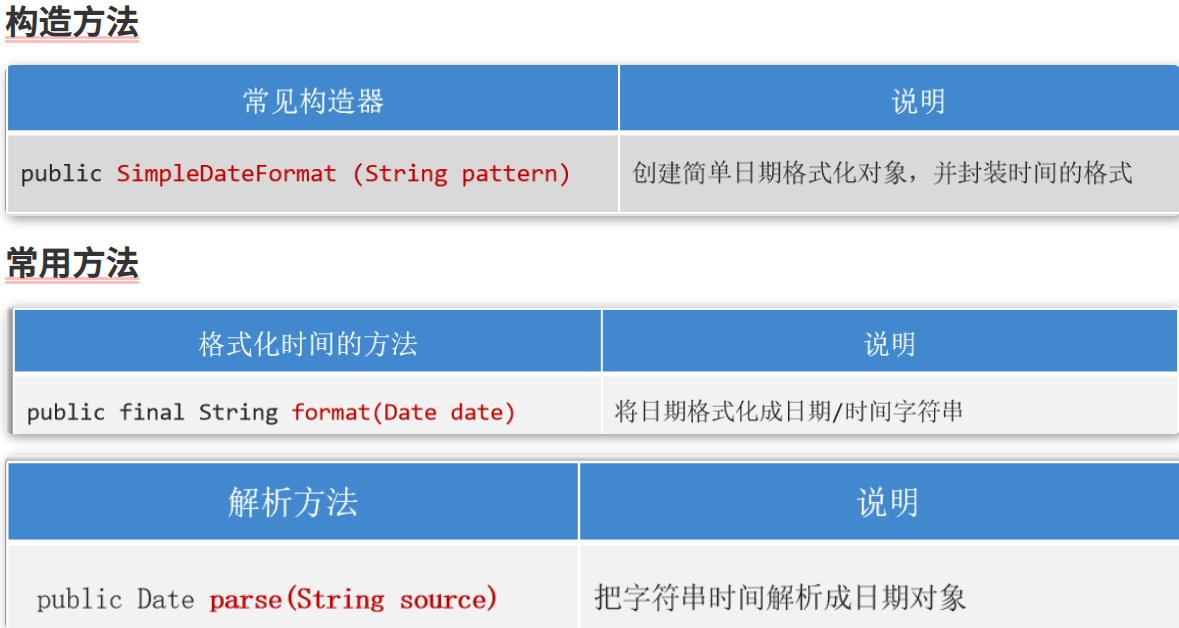
Calendar
概述
是java7提供的一个用于表示日历的类,可以对时间进行推移运算;
使用方式
- 利用静态方法获取对象;
- 面向对象,调用方法;
常用方法
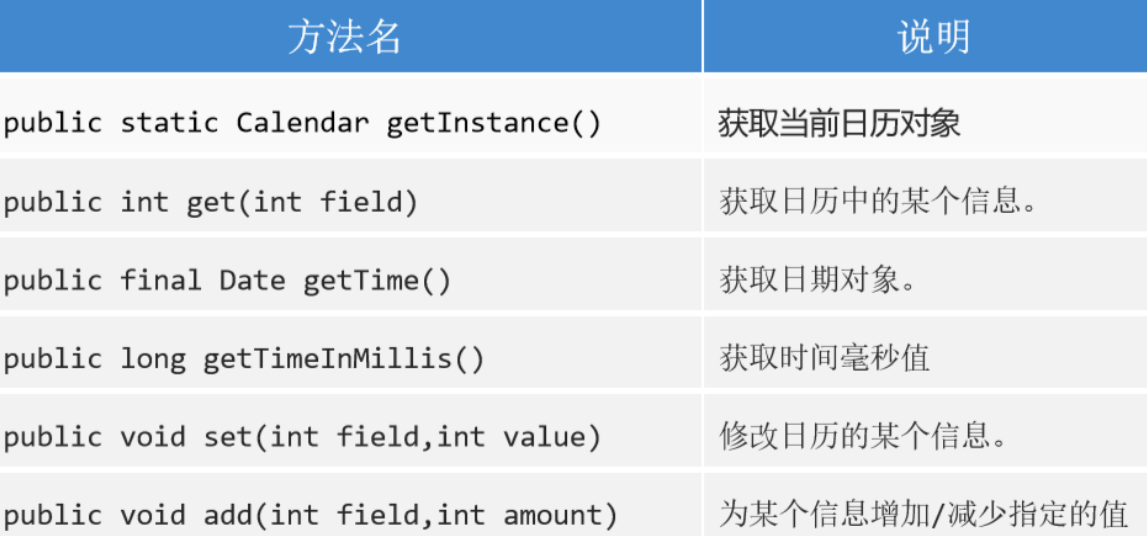
代码案例
1
2
3
4
5
6
7
8
9
10
11
12
13
14
15
16
17
18
| import java.util.Calendar;
public class MyCalendar {
public static void main(String[] args) {
Calendar ins = Calendar.getInstance();
int y = ins.get(Calendar.YEAR);
int m = ins.get(Calendar.MONTH);
int d = ins.get(Calendar.DATE);
System.out.println("年份为:" + y + "; 月份为:" + m + "; 日期为:" + d);
ins.add(Calendar.MONTH, -1);
System.out.println(ins.get(Calendar.MONTH));
}
}
|

 微信
微信 支付宝
支付宝