上篇说了JDK7的Calendar以及SimpleDateFormat等相关日期类,其实最好还是使用JDK8中的日期类,安全且支持更加丰富。
JDK7和8日期类比较
JDK8新增的日期类分得更细致一些,比如表示年月日用LocalDate类、表示时间秒用LocalTime类、而表示年月日时分秒用LocalDateTime类等;除了这些类还提供了对时区、时间间隔进行操作的类等,用起来特别方便。
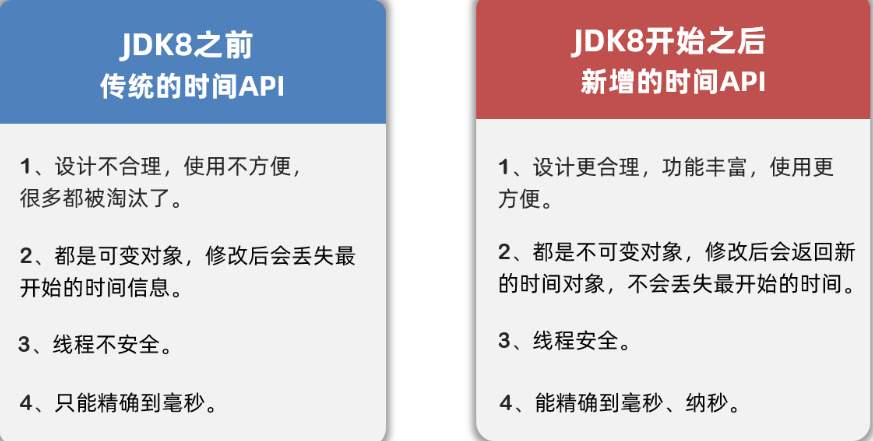
详细说明
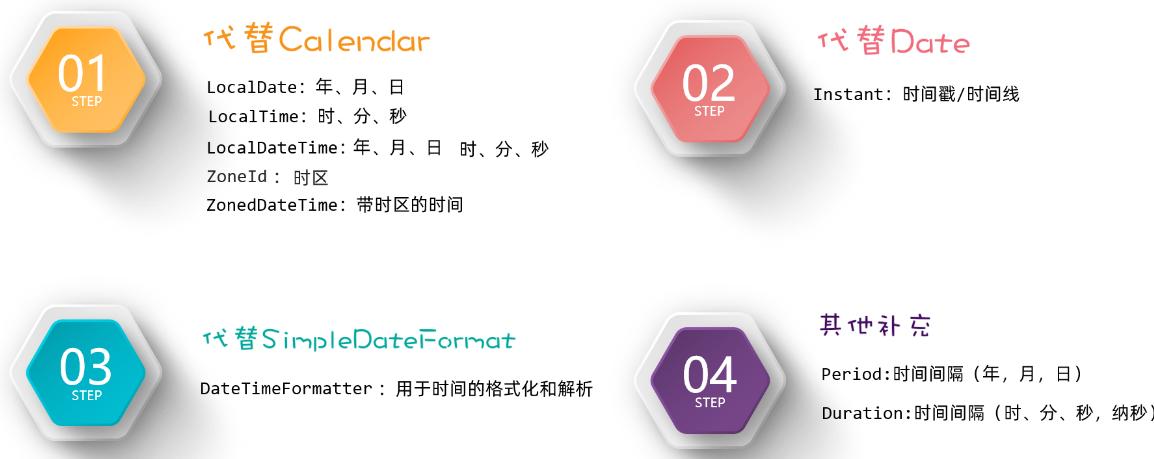
JDK8日期
Notes: 这里part1,2,3,4是上图中的四大模块。
PART1
LocalDate、LocalTime、以及LocalDateTime类。这三个类的用法基本大同小异,由于我之前偷懒就写了一个Demo,这里就copy一下别人的代码。
LocalDate类的基本使用
1
2
3
4
5
6
7
8
9
10
11
12
13
14
15
16
17
18
19
20
21
22
23
24
25
26
27
28
29
30
31
32
33
34
35
36
37
38
39
40
41
| public class Test1_LocalDate {
public static void main(String[] args) {
LocalDate ld = LocalDate.now();
System.out.println(ld);
int year = ld.getYear();
int month = ld.getMonthValue();
int day = ld.getDayOfMonth();
int dayOfYear = ld.getDayOfYear();
int dayOfWeek = ld.getDayOfWeek().getValue();
System.out.println(year);
System.out.println(day);
System.out.println(dayOfWeek);
LocalDate ld2 = ld.withYear(2099);
LocalDate ld3 = ld.withMonth(12);
System.out.println(ld2);
System.out.println(ld3);
System.out.println(ld);
LocalDate ld4 = ld.plusYears(2);
LocalDate ld5 = ld.plusMonths(2);
LocalDate ld6 = ld.minusYears(2);
LocalDate ld7 = ld.minusMonths(2);
LocalDate ld8 = LocalDate.of(2099, 12, 12);
LocalDate ld9 = LocalDate.of(2099, 12, 12);
System.out.println(ld8.equals(ld9));
System.out.println(ld8.isAfter(ld));
System.out.println(ld8.isBefore(ld));
}
}
|
LocalTime类的基本使用
1
2
3
4
5
6
7
8
9
10
11
12
13
14
15
16
17
18
19
20
21
22
23
24
25
26
27
28
29
30
31
32
33
34
35
36
37
38
39
40
41
42
| public class Test2_LocalTime {
public static void main(String[] args) {
LocalTime lt = LocalTime.now();
System.out.println(lt);
int hour = lt.getHour();
int minute = lt.getMinute();
int second = lt.getSecond();
int nano = lt.getNano();
LocalTime lt3 = lt.withHour(10);
LocalTime lt4 = lt.withMinute(10);
LocalTime lt5 = lt.withSecond(10);
LocalTime lt6 = lt.withNano(10);
LocalTime lt7 = lt.plusHours(10);
LocalTime lt8 = lt.plusMinutes(10);
LocalTime lt9 = lt.plusSeconds(10);
LocalTime lt10 = lt.plusNanos(10);
LocalTime lt11 = lt.minusHours(10);
LocalTime lt12 = lt.minusMinutes(10);
LocalTime lt13 = lt.minusSeconds(10);
LocalTime lt14 = lt.minusNanos(10);
LocalTime lt15 = LocalTime.of(12, 12, 12);
LocalTime lt16 = LocalTime.of(12, 12, 12);
System.out.println(lt15.equals(lt16));
System.out.println(lt15.isAfter(lt));
System.out.println(lt15.isBefore(lt));
}
}
|
LocalDateTime类的基本使用
1
2
3
4
5
6
7
8
9
10
11
12
13
14
15
16
17
18
19
20
21
22
23
24
25
26
27
28
29
30
31
32
33
34
35
36
37
38
39
40
41
42
43
44
45
46
47
48
49
50
51
52
53
54
55
| public class Test3_LocalDateTime {
public static void main(String[] args) {
LocalDateTime ldt = LocalDateTime.now();
System.out.println(ldt);
int year = ldt.getYear();
int month = ldt.getMonthValue();
int day = ldt.getDayOfMonth();
int dayOfYear = ldt.getDayOfYear();
int dayOfWeek = ldt.getDayOfWeek().getValue();
int hour = ldt.getHour();
int minute = ldt.getMinute();
int second = ldt.getSecond();
int nano = ldt.getNano();
LocalDateTime ldt2 = ldt.withYear(2029);
LocalDateTime ldt3 = ldt.withMinute(59);
LocalDateTime ldt4 = ldt.plusYears(2);
LocalDateTime ldt5 = ldt.plusMinutes(3);
LocalDateTime ldt6 = ldt.minusYears(2);
LocalDateTime ldt7 = ldt.minusMinutes(3);
LocalDateTime ldt8 = LocalDateTime.of(2029, 12, 12, 12, 12, 12, 1222);
LocalDateTime ldt9 = LocalDateTime.of(2029, 12, 12, 12, 12, 12, 1222);
System.out.println(ldt9.equals(ldt8));
System.out.println(ldt9.isAfter(ldt));
System.out.println(ldt9.isBefore(ldt));
LocalDate ld = ldt.toLocalDate();
LocalTime lt = ldt.toLocalTime();
LocalDateTime ldt10 = LocalDateTime.of(ld, lt);
}
}
|
ZoneId时区
概述
获取方法
1
2
3
| 利用静态方法 of(字符串时区); 获取指定时区对象
利用静态方法 systemDefault();获取当前系统默认时区对象
利用静态方法 getAvailableZoneIds();获取当前系统支持的所有时区对象
|
应用场景
1
| 把时区对象,当成 ZoneDateTime的参数,获取一个带时区的日期对象;
|
代码案例
1
2
3
4
5
6
7
8
9
10
11
12
13
14
15
16
17
18
19
20
21
22
23
| import java.time.ZoneId;
import java.time.ZonedDateTime;
public class MyZoneDate {
public static void main(String[] args) {
System.out.println(ZoneId.systemDefault());
System.out.println(ZoneId.getAvailableZoneIds());
ZoneId of = ZoneId.of("America/New_York");
System.out.println(of);
System.out.println(ZonedDateTime.now());
System.out.println(ZonedDateTime.now(of));
System.out.println(ZonedDateTime.now(of).getDayOfMonth());
}
}
|
PART2(Instant)
通过获取Instant的对象可以拿到此刻的时间,该时间由两部分组成:从1970-01-01 00:00:00 开始走到此刻的总秒数+不够1秒的纳秒数。
概述
获取方法
常用方法
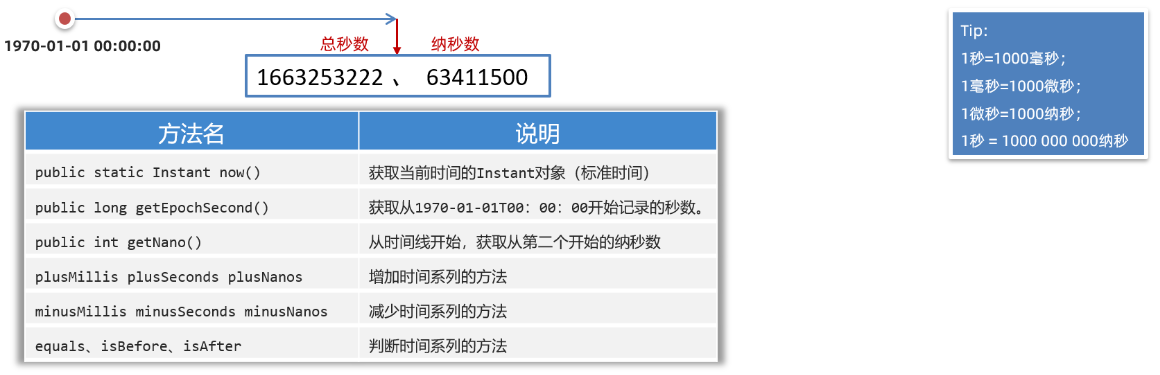
代码案例
1
2
3
4
5
6
7
8
9
10
11
12
13
14
15
16
17
18
19
| import java.time.Instant;
public class MyInstant {
public static void main(String[] args) {
Instant now = Instant.now();
System.out.println(now);
System.out.println(now.getEpochSecond());
System.out.println(System.currentTimeMillis());
Instant instant = now.plusSeconds(-30);
System.out.println(instant);
}
}
|
概述
1
| 是jdk8提供的日期格式化的工具类,可以当成日期格式化和解析日期时候的参数使用;
|
获取方式
1
| 静态方法: ofPattern("模式字符串");
|
解析和格式化的方法
- 解析,使用 日期类(LocalDateTime)中的静态方法 parse,传递要解析的字符串和格式化工具对象;
- 格式化,使用 日期对象 format(格式化工具对象);
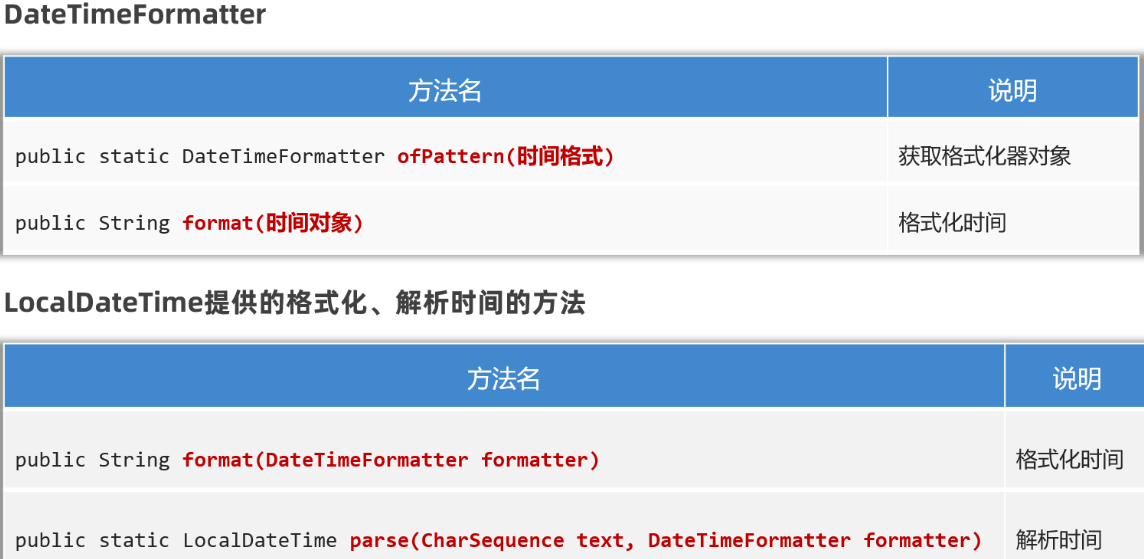
代码案例
1
2
3
4
5
6
7
8
9
10
11
12
13
14
15
16
|
public class MyDateTimeFormatter {
public static void main(String[] args) {
DateTimeFormatter sf = DateTimeFormatter.ofPattern("yyyy-MM-dd HH:mm:ss");
LocalDateTime now = LocalDateTime.now();
System.out.println(now.format(sf));
LocalDateTime dt = LocalDateTime.parse("2021-01-01 11:11:11", sf);
System.out.println(dt);
}
}
|
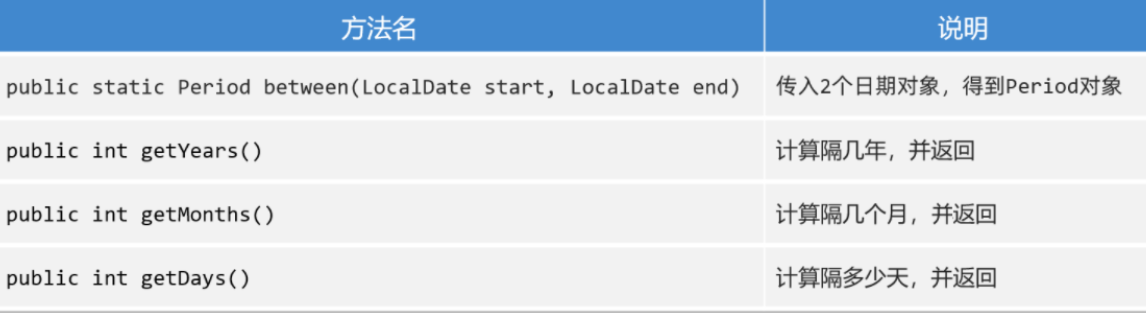
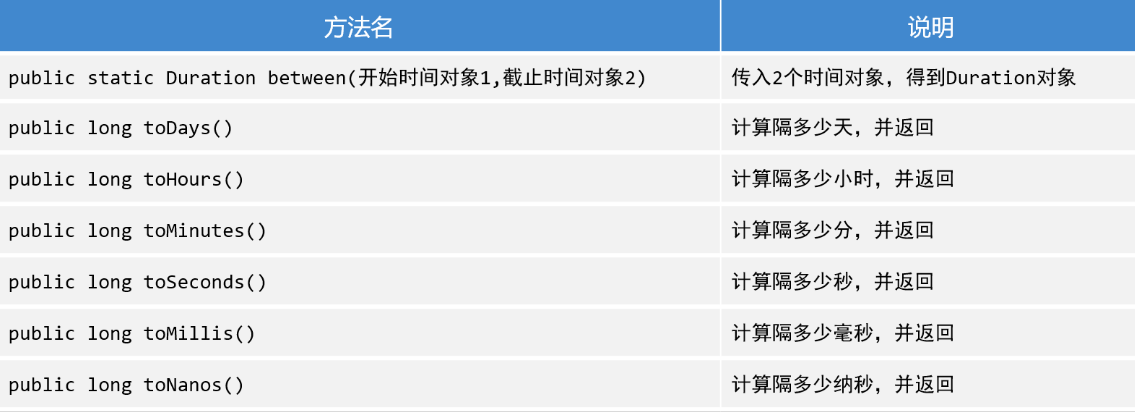
PART4(Period&Duration)
概述
1
| 把一个时间段看成了对象,让程序员可以面向这个时间段操作;
|
分类
Period: 粗粒度间隔对象
Duration: 细粒度间隔对象
获取方式
利用静态方法 between(两个时间对象)
注意事项
Period能操作只能操作LocalDate;
Duration只能操作带毫秒的时间对象;(除了LocalDate之外的时间对象)
常用方法
- getXxx(); 获取信息或 toXxx()获取信息
- Period
- Duration
Period代码案例
1
2
3
4
5
6
7
8
9
10
11
12
13
14
| public class PeriodTest {
public static void main(String[] args) {
LocalDate now = LocalDate.now();
LocalDate of = LocalDate.of(2024, 1, 9);
Period between = Period.between(of, now);
System.out.println(between.getYears());
System.out.println(between.getMonths());
System.out.println(between.getDays());
System.out.println(between.toTotalMonths());
}
}
|
Duration代码案例
1
2
3
4
5
6
7
8
9
10
11
12
13
14
15
16
17
18
19
20
|
public class DurationTest {
public static void main(String[] args) {
LocalDateTime now = LocalDateTime.now();
LocalDateTime of = LocalDateTime.of(2024, 1, 25, 01, 02, 03);
Duration between = Duration.between(of, now);
System.out.println(between.toDays());
System.out.println(between.toHours());
}
}
|

 微信
微信 支付宝
支付宝